
Ready to Automate Your Warehouse Labeling? A Practical Guide to Getting Started
May 15, 2026
Catherine Hornsby
Ready to Automate your Warehouse?
Start with Labeling!
Automating your fulfillment and shipping doesn’t have to be complicated. Labeling is one of the most logical and low-barrier places to begin.
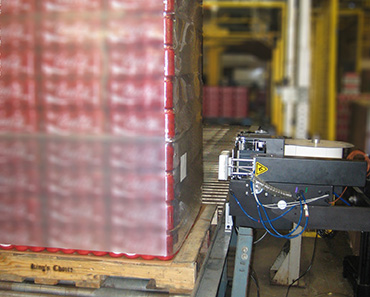
From Label Printer to Print-and-Apply
Most companies already have some form of label printing, usually a desktop label printer, but labels still have to be applied manually. While this works when you’re just starting out or processing a limited number of shipments per day, it becomes more challenging as fulfillment volumes increase. Once you’re sending out a significant number of shipments, it’s probably time to automate.If you already have a powered conveyor line, adding a label print-and-apply system is straightforward. The print-and-apply system essentially replaces your desktop printer, with one major advantage: it automatically applies the label to the box, increasing throughput, reducing labeling errors, and freeing up labor. Data from your shipping database is sent to the print-and-apply system just as it would be to your label printer. The data can be referenced by scanning a license plate label that corresponds with the order or by queuing it from a database. With a choice of major printing technologies—such as Zebra, SATO, and TSC—and print-language emulations, data streams can be matched to your existing technology.
To apply labels, each print-and-apply system uses some type of applicator device. In fulfillment applications, this is most often a pneumatic or electric cylinder with a tamp pad that extends to place the label on the box or pallet. Pneumatic applicators are highly accurate and dependable, but require factory air on the conveyor line, whereas electric applicators offer a bit more flexibility by eliminating the need for an air hook-up. These types of applicators can also be fitted with random-distance sensing for boxes that vary in height or are not justified on the conveyor. Other common applicator types include corner-wrap and adjacent-panel applicators, which place labels on multiple sides for visibility, and blow-on applicators, which blow the label onto the surface without direct contact—ideal for fragile products.
The print and apply process is activated by a sensor on the conveyor line to detect the box or pallet. If labels are queued, the sensor signals the system to apply the label. If using a scanner to pull data, the sensor triggers the data grab, the unit prints the label, and the label is applied on demand. A PLC controlling the conveyor line can also send a signal to the print-and-apply system to trigger this process.
But what if you don’t have a powered conveyor line?
You can still automate your labeling, even if you don’t have a powered conveyor. An automated labeling workstation is a great solution. The process is the same, just on a short, powered conveyor section. The scanner, sensor, and print-and-apply system are mounted on a compact conveyor. One operator loads boxes on one end, and another collects and stacks them on the other. While this may seem like adding labor, the increased throughput and reduction in labeling errors justify the process. If the product is not fragile, the labeled item can also be collected in a container after being labeled without adding labor. Additionally, the workstation can be incorporated into a conveyor line later as automation expands.As your needs grow, your labeling system can grow with you. Automated labeling is often paired with other automated systems—case sealers, weigh scales, dimensioning systems, scanners, verifiers, and robotic palletizers—to increase processing efficiency. Additional labeling systems can be added to new lines or piggy-backed onto existing ones to support higher throughput.
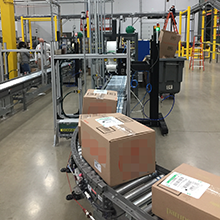
What Will You Gain by Automating Your Labeling?
Return on investment is easy to see with automated labeling. The benefits include:1. Increased throughput.
By increasing throughput, you reduce late shipments caused by processing delays while improving customer satisfaction. It also helps eliminate charge-backs due to late shipments.
2. Reduction of labeling errors.
Automation ensures labels match the correct shipment. Accurate placement also reduces rework and potential non-compliance fees.
3. Reduced or repurposed labor costs.
Labor can be reduced or redirected from manual labeling to other essential tasks.
Where Do You Start?
First, gather information on your current process and determine your ideal end goal.
- Do you want a labeling station that can later be integrated into a larger system?
- Do you want to add labeling to your current line?
- Are you focused on reducing errors?
- You’ll want to communicate all of this to potential suppliers.
Next, research labeling automation companies.
- What systems do they offer?
- What is their experience level?
- Can their systems work with your current label size and printing technology?
- What support do they provide?
- Will they be able to scale with you?
Finally, contact the labeling company of your choice to set up a consultation. Explain your current process and goals. Evaluate the solutions offered and your comfort level with their ability to meet your needs. When you find the right fit, you’re ready to start automating.